1. Audited the current security state
Before designing anything, I checked what principals already existed against climate_dba. Result: only the built-in principals SQL Server creates automatically (dbo, guest, INFORMATION_SCHEMA, sys) — confirming I was designing security completely from scratch.
2. Built a least-privilege role model with real logins
I designed three roles around realistic access patterns:
- climate_readonly — SELECT only, for reporting/analytics users
- climate_readwrite — SELECT, INSERT, UPDATE, DELETE, for an application or ETL process
- climate_admin — full control over the climate schema, for a DBA/developer doing schema changes without full server-level sysadmin rights
I created real SQL logins and users mapped to each role, rather than just designing the roles on paper.
climate_admin's permissions included CREATE TABLE scoped to the schema (GRANT ... CREATE TABLE ON SCHEMA::climate), which failed with Msg 102, Incorrect syntax. CREATE TABLE is a database-level permission in SQL Server, not something that can be scoped to a specific schema via GRANT ... ON SCHEMA::. I fixed this by splitting it into two separate statements: GRANT SELECT, INSERT, UPDATE, DELETE, ALTER ON SCHEMA::climate TO climate_admin; followed by GRANT CREATE TABLE TO climate_admin;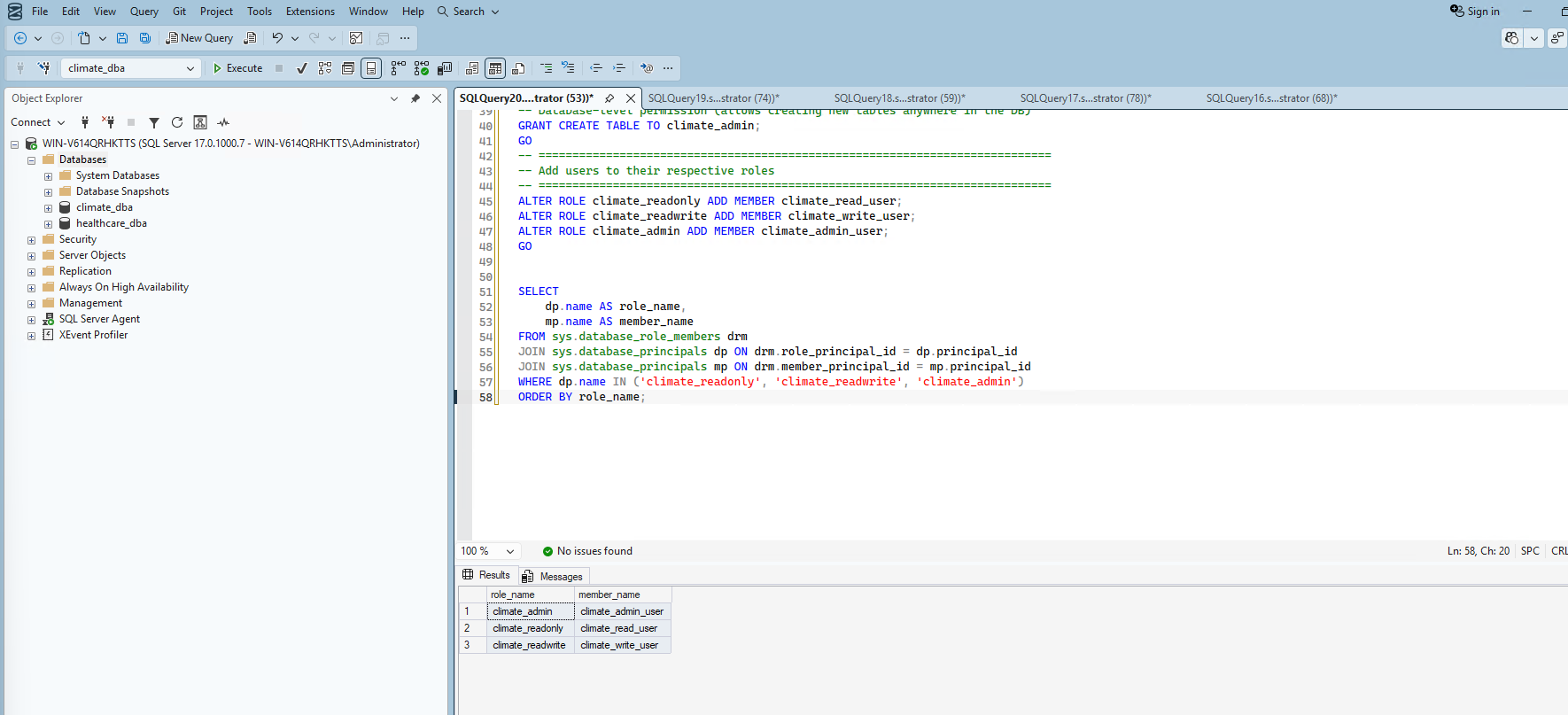
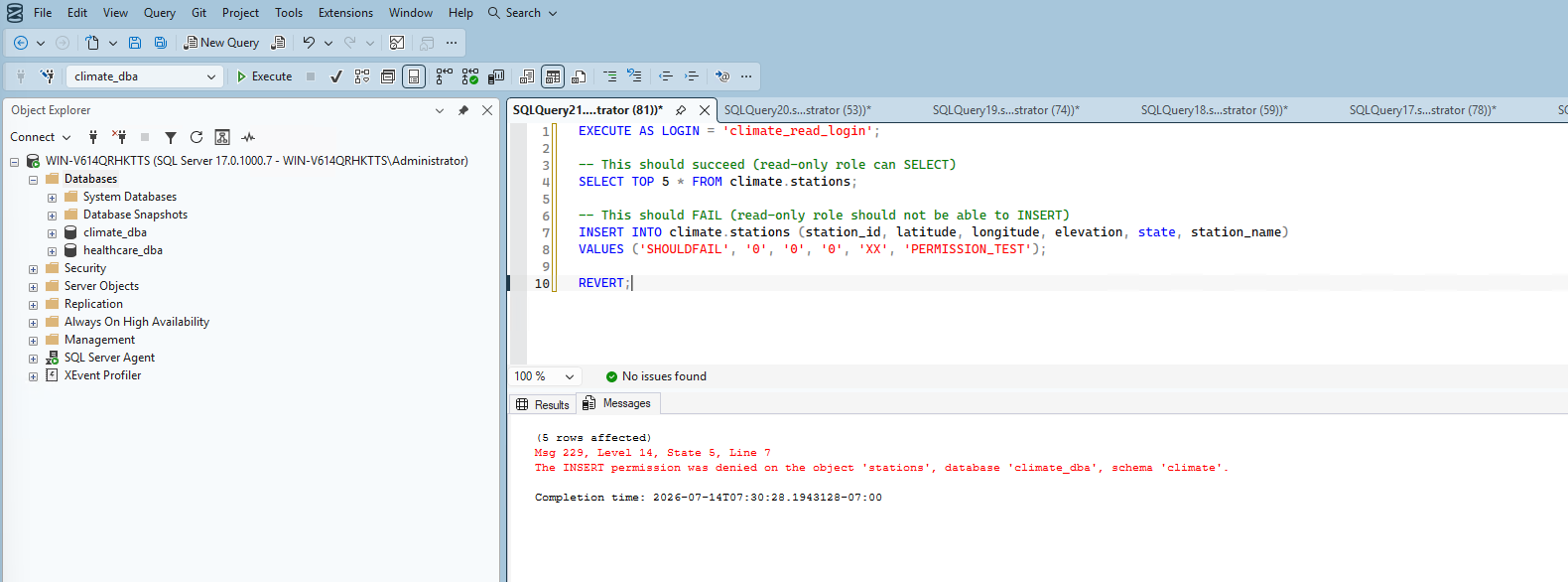
I didn't stop at configuration — I tested it. I ran a real permission check as climate_read_login, confirming SELECT succeeded but INSERT was genuinely denied: Msg 229, The INSERT permission was denied on the object 'stations'... — real, verified proof the read-only role genuinely cannot write, not just a permission model that looks right on paper.
3. Enabled Transparent Data Encryption (TDE)
TDE encrypts the entire database at rest — if someone stole the physical .mdf/.ldf files, they'd be unreadable without the encryption certificate.
USE master;
CREATE MASTER KEY ENCRYPTION BY PASSWORD = '...';
CREATE CERTIFICATE climate_dba_tde_cert WITH SUBJECT = 'Certificate for climate_dba TDE';

BACKUP CERTIFICATE climate_dba_tde_cert
TO FILE = 'C:\ClimateData\climate_dba_tde_cert.cer'
WITH PRIVATE KEY (
    FILE = 'C:\ClimateData\climate_dba_tde_cert.pvk',
    ENCRYPTION BY PASSWORD = '...'
);

USE climate_dba;
CREATE DATABASE ENCRYPTION KEY
WITH ALGORITHM = AES_256
ENCRYPTION BY SERVER CERTIFICATE climate_dba_tde_cert;

ALTER DATABASE climate_dba SET ENCRYPTION ON;
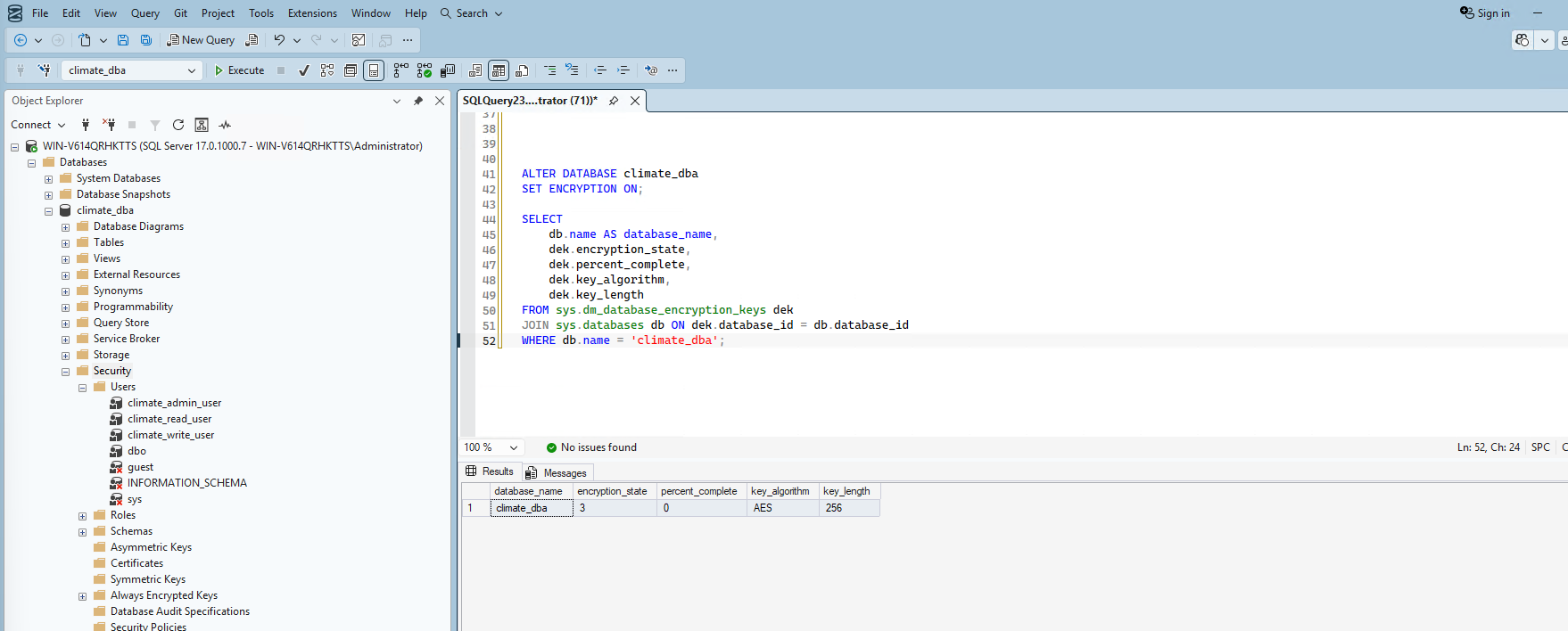
I checked encryption state twice — my first check showed encryption_state = 2 (In Progress) at 48.47% complete, since encrypting a ~7GB database takes real time. The second check confirmed completion: encryption_state = 3 (Encrypted), AES-256 — TDE genuinely active.
4. Implemented Row-Level Security (RLS)
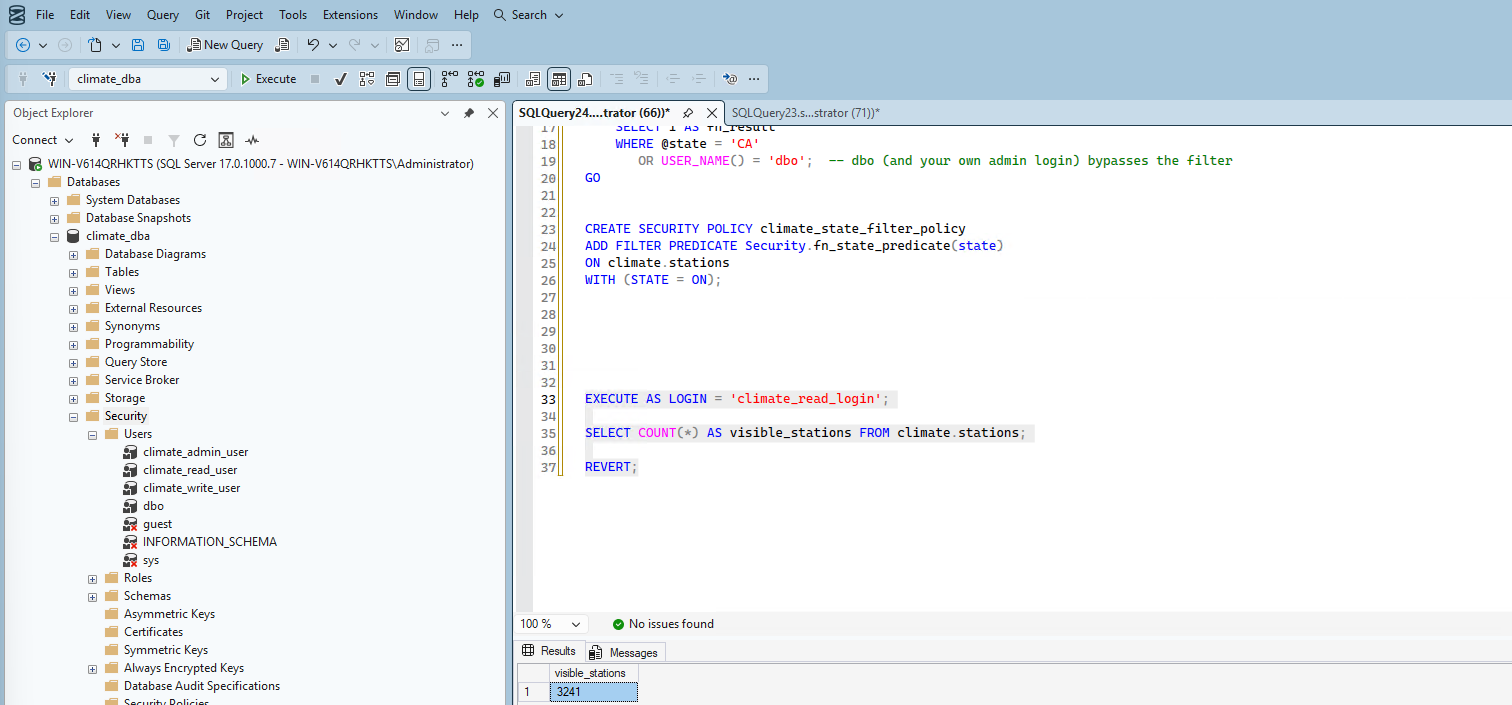
Scenario: restrict climate_read_user to only see stations (and by extension, their data) from California — simulating a regional analyst who should only access their assigned region, not the entire nationwide dataset. I confirmed the real CA station count first: 3,241 CA stations out of 132,501 total.
CREATE SCHEMA Security;

CREATE FUNCTION Security.fn_state_predicate(@state VARCHAR(10))
RETURNS TABLE
WITH SCHEMABINDING
AS
RETURN
    SELECT 1 AS fn_result
    WHERE @state = 'CA'
       OR USER_NAME() = 'dbo';

CREATE SECURITY POLICY climate_state_filter_policy
ADD FILTER PREDICATE Security.fn_state_predicate(state)
ON climate.stations
WITH (STATE = ON);
Verified with real evidence, both directions: as climate_read_login, the visible station count was exactly 3,241 — the CA-only count. Under my own admin context, it was 132,501 — the full table, confirming the dbo bypass condition works correctly without accidentally restricting privileged access.
5. Applied Dynamic Data Masking
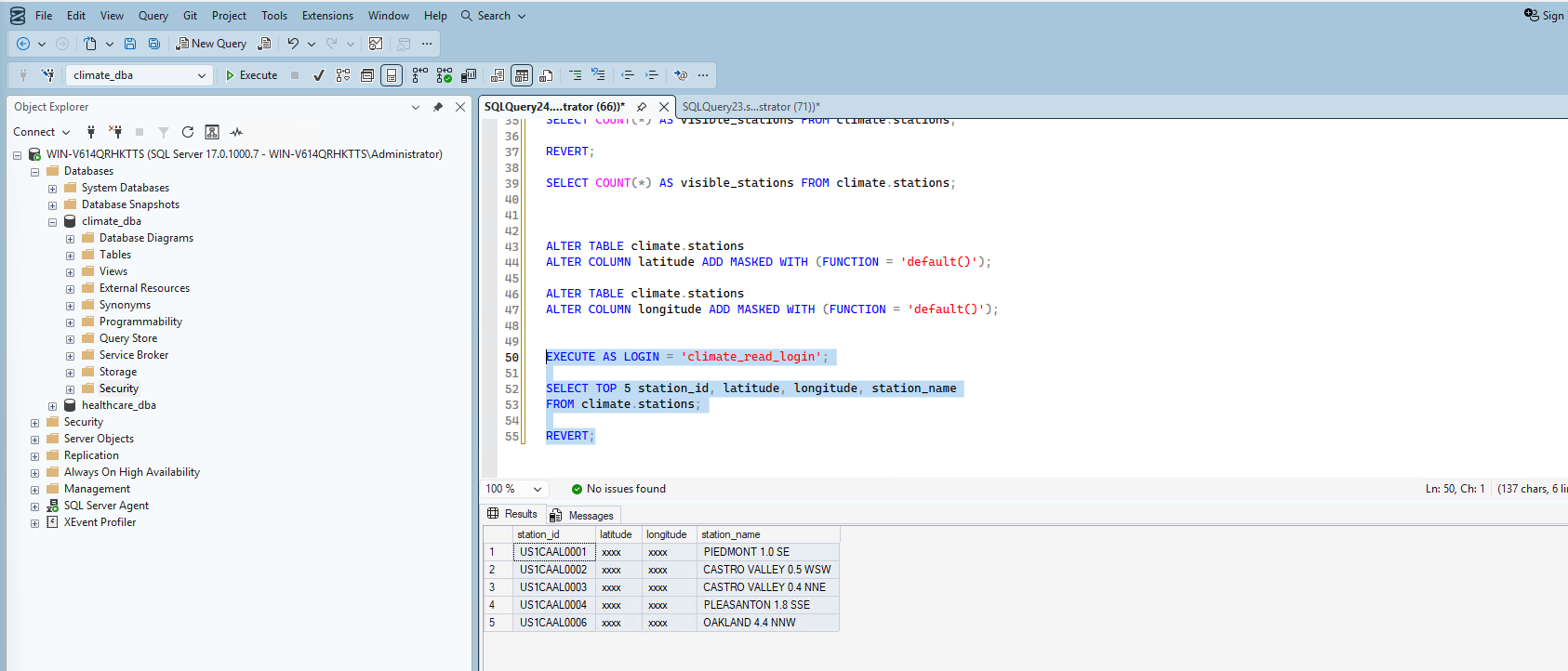
I masked latitude and longitude — treating precise geographic coordinates as sensitive location data that lower-privilege users shouldn't see in full precision.
ALTER TABLE climate.stations
ALTER COLUMN latitude ADD MASKED WITH (FUNCTION = 'default()');

ALTER TABLE climate.stations
ALTER COLUMN longitude ADD MASKED WITH (FUNCTION = 'default()');
Verified as climate_read_login: latitude and longitude both showed xxxx, while station_id and station_name remained visible normally. As a nice side-confirmation, all 5 rows returned were CA stations (US1CA... prefixes) — proving RLS and masking are working together correctly, not just individually. Under my own admin context, real, unmasked coordinates were still visible.
Summary
| Security layer | Status | Verification |
|---|---|---|
| Least-privilege roles | ✅ Implemented | Read-only role genuinely denied INSERT (Msg 229) |
| Real logins/users | ✅ Created | 3 logins mapped to 3 roles, confirmed via role membership query |
| TDE | ✅ Enabled | encryption_state = 3, AES-256, certificate backed up |
| Row-Level Security | ✅ Implemented | climate_read_login sees 3,241 (CA only); admin sees 132,501 |
| Dynamic Data Masking | ✅ Implemented | climate_read_login sees masked lat/long; admin sees real values |
What's Next
With a genuinely tested security model in place — not just configured, but verified with real evidence at every layer — Phase 7 moves into auditing and compliance: SQL Server Audit, login auditing, and change tracking.