1. Designed the backup strategy against a real RPO requirement
Before writing any backup commands, I established a real constraint to design against: the maximum acceptable data loss (RPO — Recovery Point Objective) is 10 minutes. Rather than picking an arbitrary schedule, I built the strategy backward from that number.
Since log backups are what actually control RPO (they capture every transaction between backups), I set log backups to run every 5 minutes — a 2x safety margin under the 10-minute ceiling, so a single missed or delayed job still keeps me within requirement before the next one runs.
| Backup type | Frequency | Reasoning |
|---|---|---|
| Full | Weekly | Standard practice — differentials and logs handle everything in between |
| Differential | Daily | Captures a day's changes without a full backup's overhead |
| Transaction log | Every 5 minutes | Meets the 10-minute RPO with a 2x safety margin |
2. Took a full backup
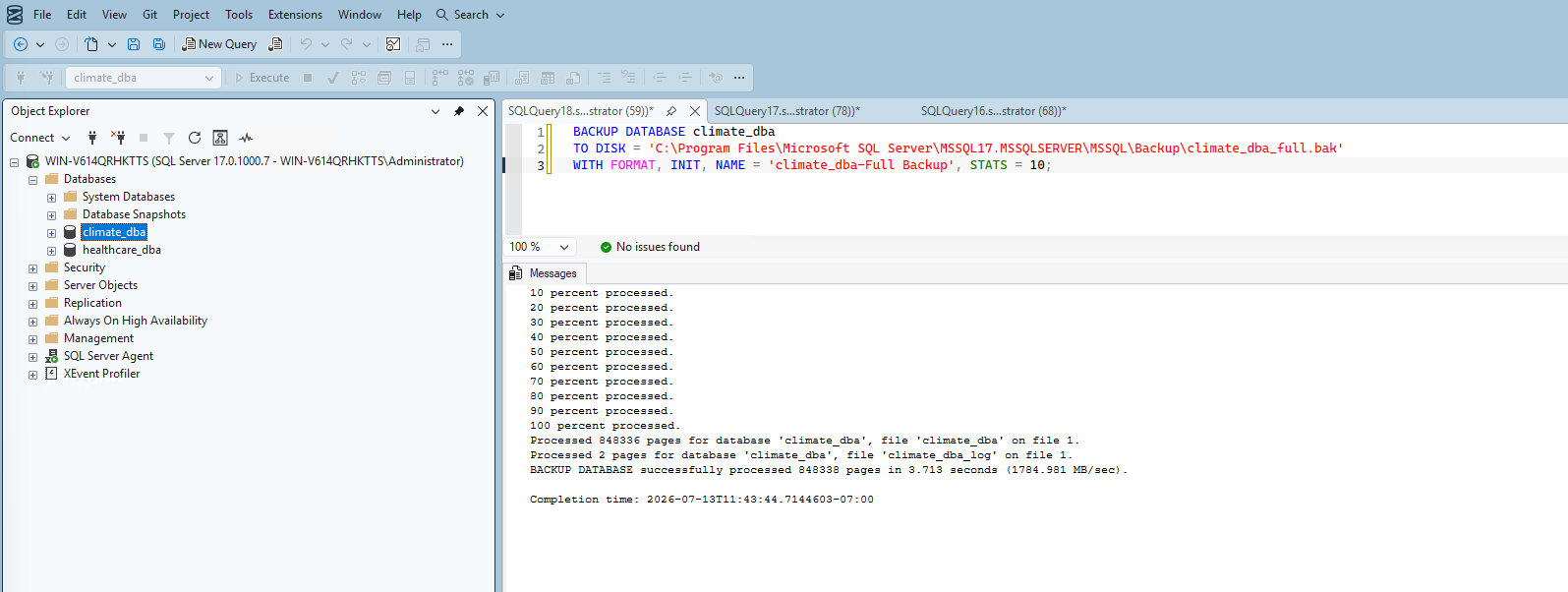
BACKUP DATABASE climate_dba
TO DISK = 'C:\...\Backup\climate_dba_full.bak'
WITH FORMAT, INIT, NAME = 'climate_dba-Full Backup', STATS = 10;
Real result: 848,336 pages processed in 3.713 seconds (1784.981 MB/sec).
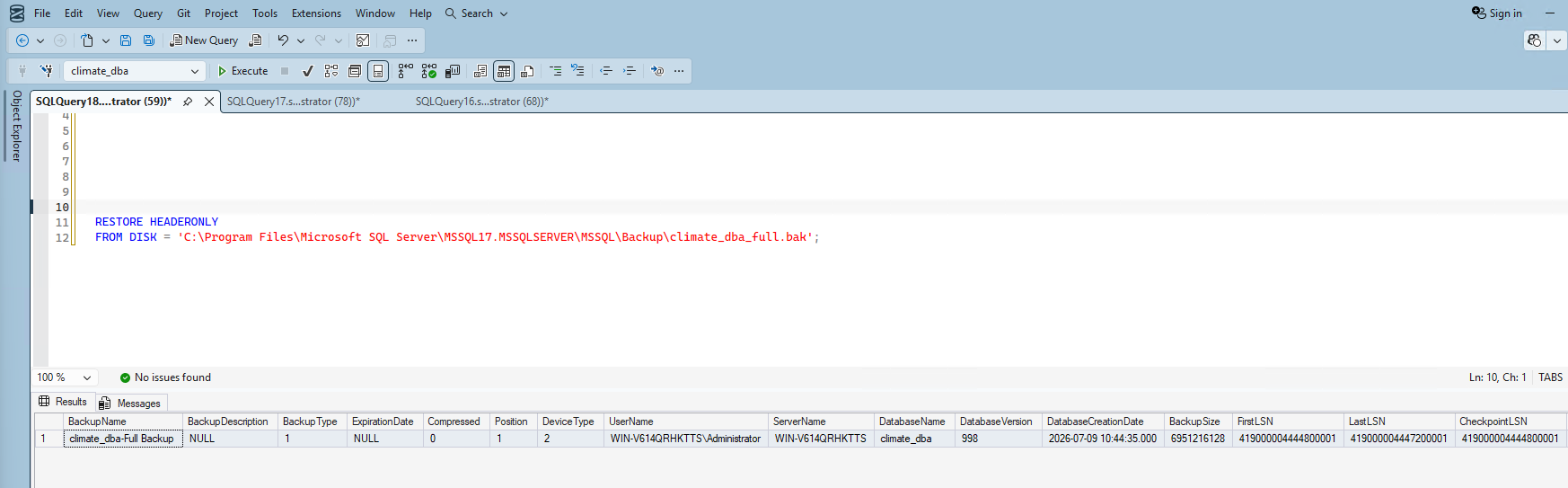
I verified the backup file was valid by reading its header without restoring anything. Confirmed: Full backup type, ~6.47GB size, Full recovery model.
3. Took a differential backup
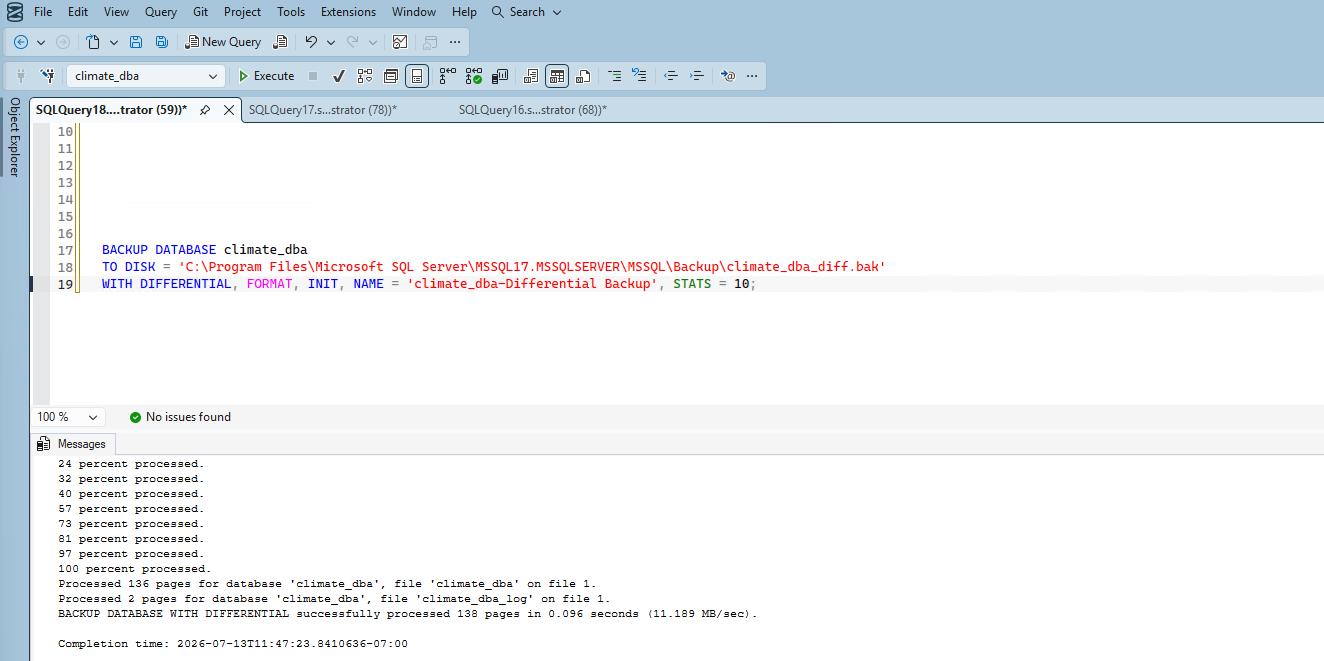
BACKUP DATABASE climate_dba
TO DISK = 'C:\...\Backup\climate_dba_diff.bak'
WITH DIFFERENTIAL, FORMAT, INIT, NAME = 'climate_dba-Differential Backup', STATS = 10;
Real result: only 136 pages processed in 0.096 seconds — confirms the differential mechanism correctly captured just the small amount of changes since the full backup, not the entire database again.
4. Took a transaction log backup
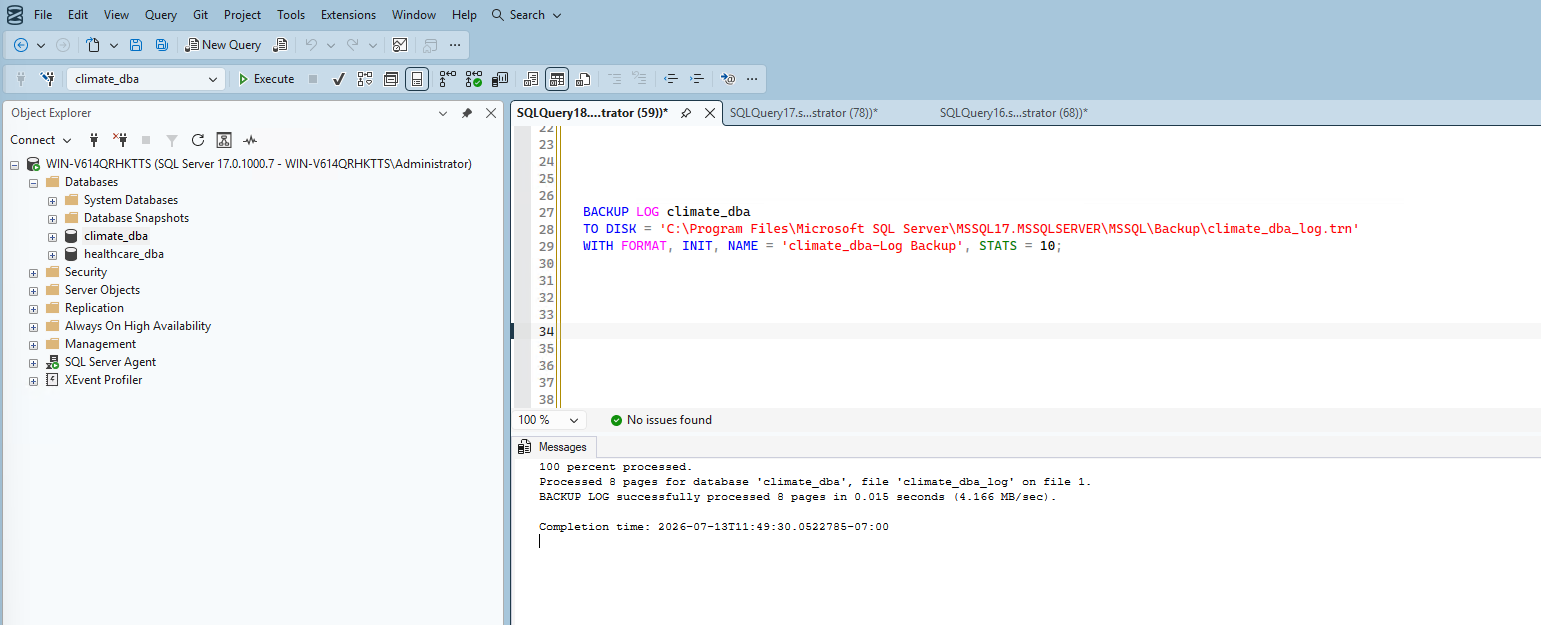
BACKUP LOG climate_dba
TO DISK = 'C:\...\Backup\climate_dba_log.trn'
WITH FORMAT, INIT, NAME = 'climate_dba-Log Backup', STATS = 10;
Real result: 8 pages processed in 0.015 seconds.
5. Ran a real point-in-time recovery drill
Taking backups proves nothing on its own — I wanted real, verified evidence that the backup chain actually enables recovery to a specific moment, not just to the last backup taken.
Step 1 — Made an identifiable change (timestamp: 2026-07-13 11:51:06.477):
INSERT INTO climate.stations (station_id, latitude, longitude, elevation, state, station_name)
VALUES ('TEST00000', '0.0', '0.0', '0', 'TS', 'PHASE5_RESTORE_TEST_MARKER');
Step 2 — Captured the change in a second log backup:
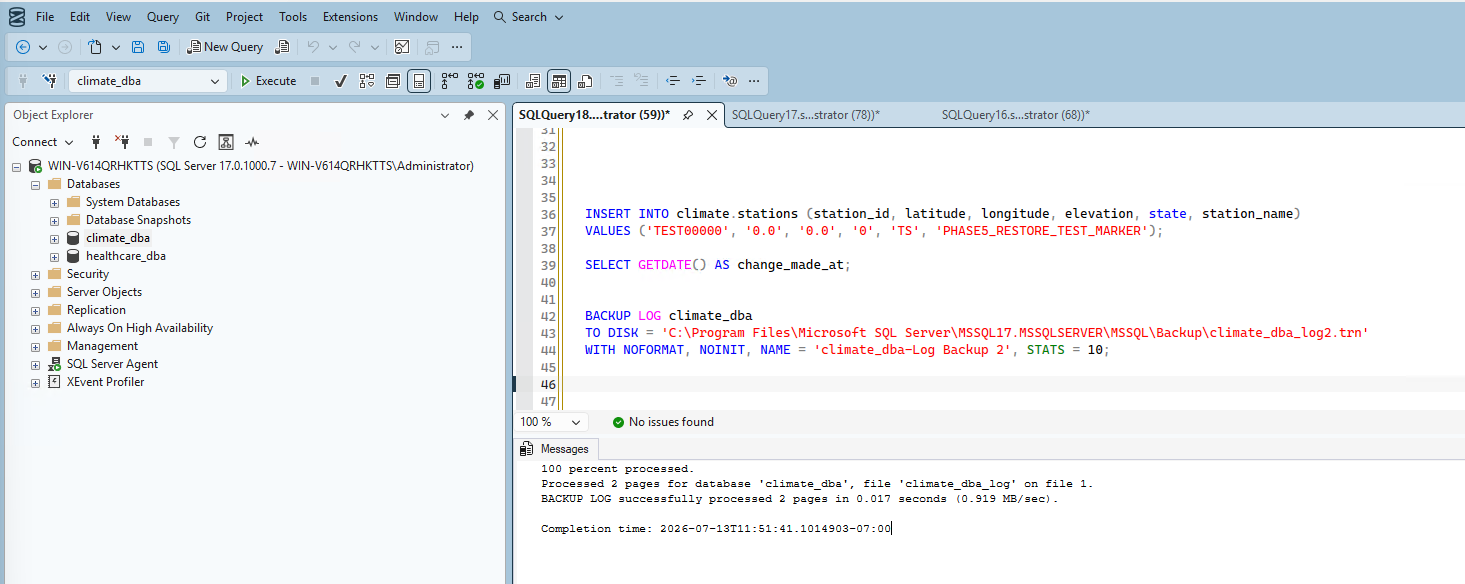
Step 3 — Executed the restore chain, restoring full → differential → log 1 with NORECOVERY, then log 2 with STOPAT = '2026-07-13 11:51:06.000' — deliberately just before the test insert:
ALTER DATABASE climate_dba SET SINGLE_USER WITH ROLLBACK IMMEDIATE;

RESTORE DATABASE climate_dba
FROM DISK = 'C:\...\Backup\climate_dba_full.bak'
WITH NORECOVERY, REPLACE, STATS = 10;

RESTORE DATABASE climate_dba
FROM DISK = 'C:\...\Backup\climate_dba_diff.bak'
WITH NORECOVERY, STATS = 10;

RESTORE LOG climate_dba
FROM DISK = 'C:\...\Backup\climate_dba_log.trn'
WITH NORECOVERY, STATS = 10;

RESTORE LOG climate_dba
FROM DISK = 'C:\...\Backup\climate_dba_log2.trn'
WITH STOPAT = '2026-07-13 11:51:06.000', RECOVERY, STATS = 10;
Step 4 — Verified the restore actually worked:
ALTER DATABASE climate_dba SET MULTI_USER;
SELECT * FROM climate.stations WHERE station_id = 'TEST00000';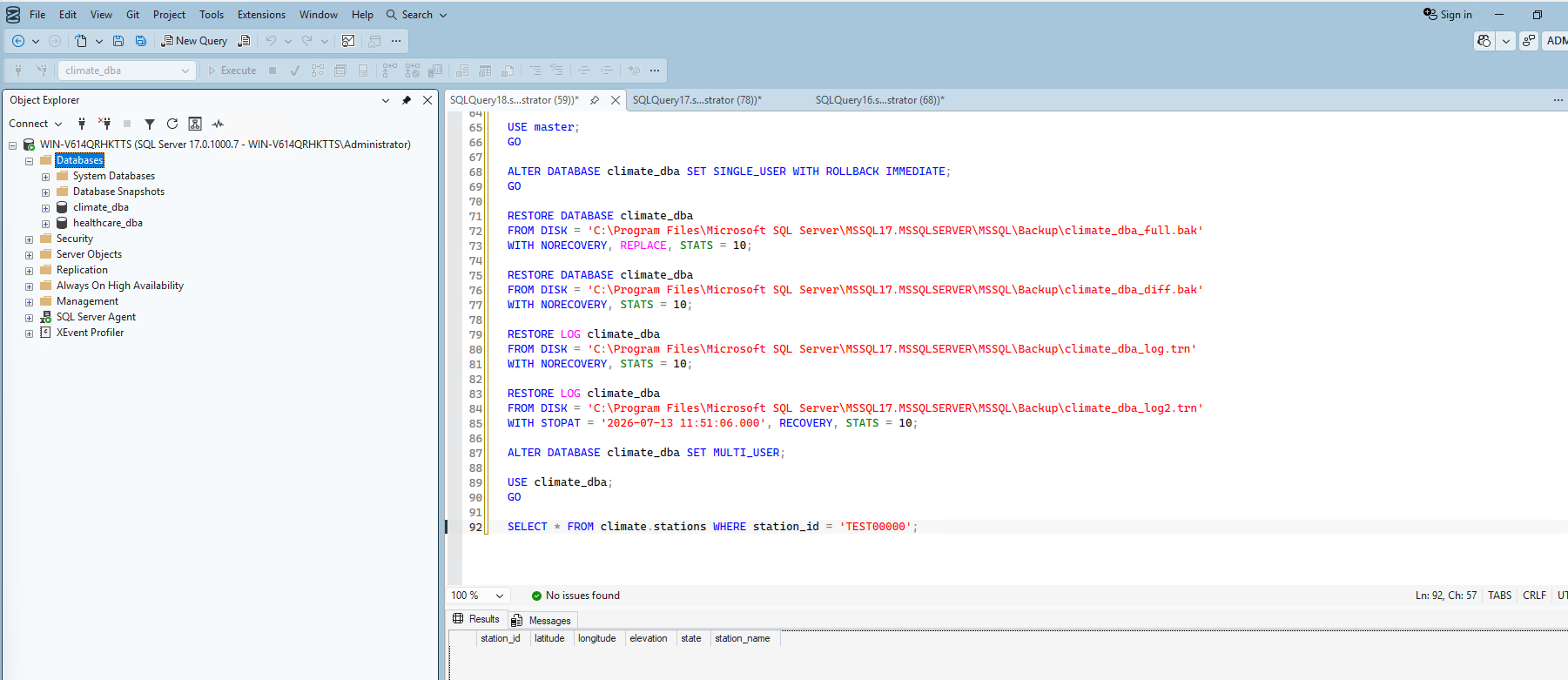
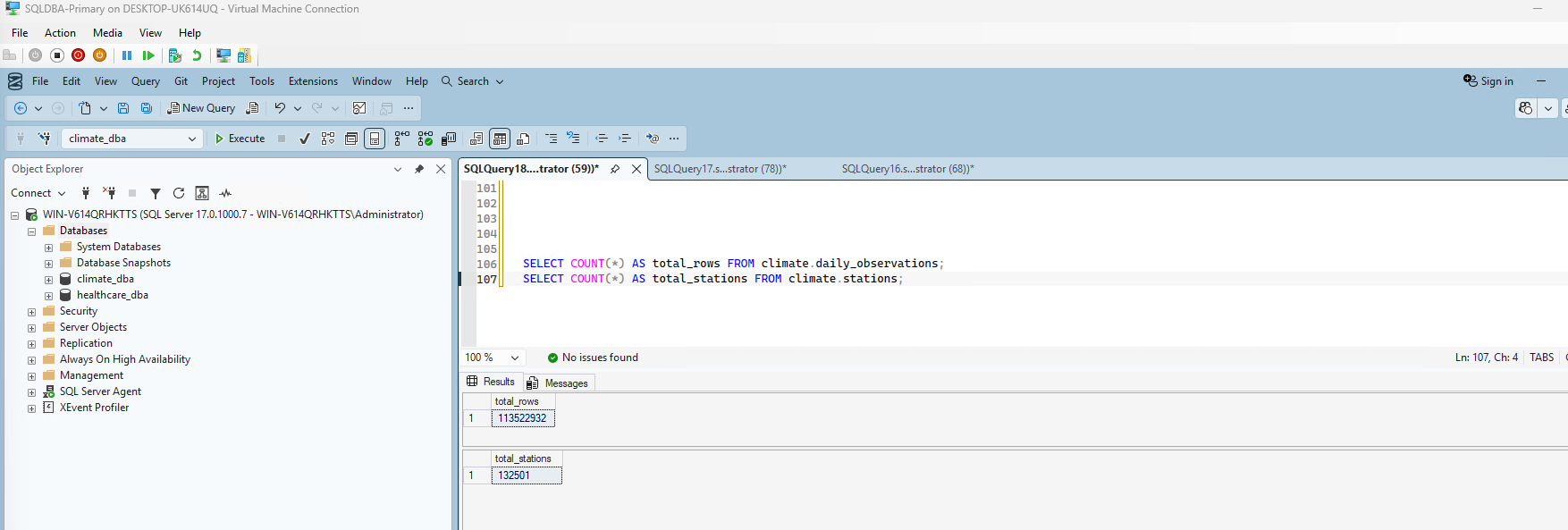
Step 5 — Confirmed the rest of the database survived intact: 113,522,932 observation rows (unchanged) and 132,501 stations — exactly one less than it would be with the test marker still present, confirming the restore removed precisely the test row and nothing else.
6. Disaster Recovery Plan
| Objective | Target | Basis |
|---|---|---|
| RPO (max acceptable data loss) | 10 minutes | Business requirement |
| RTO (max acceptable recovery time) | Under 30 minutes | Real measured restore time (~15 seconds of pure processing) plus operational overhead |
Restore procedure: disconnect users (SINGLE_USER), restore full → differential → each log backup in sequence with NORECOVERY, restore the final log with RECOVERY (and STOPAT if targeting a specific point-in-time), set MULTI_USER, then verify data integrity before considering recovery complete. This isn't theoretical — every step was executed and verified for real in this phase.
Summary
| Item | Result |
|---|---|
| Full backup | 848,336 pages, 3.713 seconds |
| Differential backup | 136 pages, 0.096 seconds |
| Log backup | 8 pages, 0.015 seconds |
| Point-in-time restore drill | Verified — test marker inserted, captured, then genuinely absent after restore |
| Post-restore data integrity | Confirmed intact — 113,522,932 observations, 132,501 stations |
| RPO | 10 minutes (business requirement) |
| RTO | Under 30 minutes (based on real measured restore times) |
What's Next
With a verified, working backup and recovery strategy in place, Phase 6 moves into security — authentication model, roles and permissions, Transparent Data Encryption, Row-Level Security, and data masking.